💎📱
How to Create a Google Account Without a Phone Number
A practical guide — 2026
How to Create a Google Account Without a Phone Number? Every time you create a new Google or Gmail account, Google asks for a phone number and sends a 6-digit SMS code to confirm it. If you would rather keep your personal number private, this guide shows you how to get through that step without using your real SIM card — whether you are creating a second Gmail, setting up Google Workspace, or simply do not want your number stored in Google’s database.
The key is using a real US carrier number, not a free VoIP one. Google blocks VoIP outright. Here is how to do it correctly.
Short answer: Google rejects VoIP numbers (including Google Voice itself). A virtual number from
TextVerify.io routes through a genuine US mobile carrier, passes Google’s verification check, and keeps your personal number completely out of their system.
1
Why Keep Your Real Number Off Google
Google stores your phone number permanently once it is added to your account. It gets linked to your Gmail, your search history, your YouTube activity, and every other Google service you use. That is a significant amount of personal data tied to a single number — and once it is in Google’s system, removing it is not straightforward.
There is also a practical limitation. Google restricts how many accounts can be verified with the same personal number. A virtual phone number lets you bypass this entirely and create accounts without ever using your real number.
💡 Important: Google actively rejects VoIP numbers — including Google Voice. Free number websites almost always provide VoIP numbers that get blocked immediately. TextVerify.io provides real non-VoIP US carrier numbers that pass Google’s verification check.
Google is one of the strictest platforms when it comes to phone verification. These options fail:
| Google Voice — Ironic but true: Google itself rejects Google Voice numbers for account verification. It detects the VoIP origin and blocks it. |
| TextNow / TextFree — VoIP. Caught by the same filter that rejects Google Voice. The code never arrives. |
| Free public SMS websites — Their number ranges are pre-flagged by Google. Even if a code arrives, it is visible to everyone on the site — a serious security risk for any Google account. |
| A recycled or previously used number — If a number was already linked to a Google account (by you or anyone else), Google may flag or reject it during new account creation. |
What Google accepts is a fresh, genuine US carrier number — private, not shared, not VoIP. That is what TextVerify.io provides.
Here is exactly how to create a Google account without using your personal number:
| 1 |
Create a TextVerify account
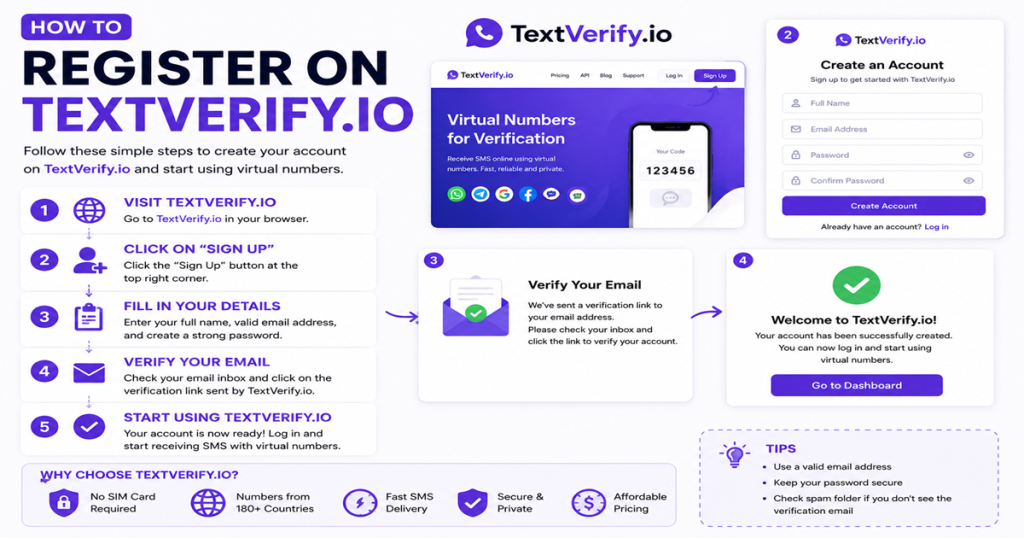
Open textverify.io and sign up with your email. No phone number required. Your SMS inbox is ready immediately.
|
| 2 |
Add credits and get a number for Google
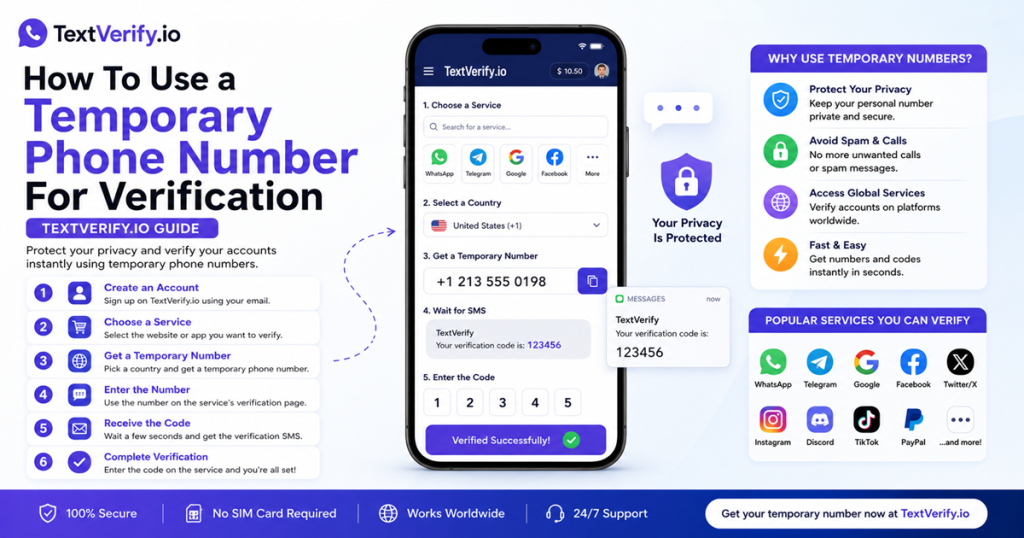
Top up your balance, search for Google or Gmail in the service list, and pick a US temporary number. Optionally choose a US state so the area code matches your account location.
|
| 3 |
Open Google account sign-up
Go to Google’s account creation page. Enter your name and the Gmail address you want. Work through the steps until Google asks for a phone number — stop there.
|
| 4 |
Paste your TextVerify number and request the code
Copy the US number from TextVerify and paste it into Google’s phone field. Set the country to United States (+1) and click Next. Switch to TextVerify immediately.
|
| 5 |
Grab the 6-digit code from your TextVerify inbox
Google’s SMS code appears on your TextVerify dashboard within seconds. Copy it straight away — it expires fast.
|
| 6 |
Enter the code and finish setup
Paste the code into Google and click Verify. Complete your account setup — recovery email, date of birth, preferences. Your Google account is now fully verified with your personal number never involved.
|
⚠️ Pro tip: Keep TextVerify and Google open side by side in two tabs. Google’s codes expire within minutes — paste the code the moment it appears on your dashboard.
| 🔠 |
Trying Google Voice first. It seems like it should work — it is a Google product — but Google explicitly blocks its own VoIP numbers during account verification. You may also hit request rate limits before you switch to a working number. |
| ⏱ |
Not acting immediately after getting the number. Once you pick your TextVerify number, go straight to Google and request the code. Do not stop to check other tabs — the active window is short. |
| 📌 |
Ignoring the state selection. Google is sensitive to location consistency. Pick a TextVerify number from the same US state as your account’s expected location to avoid triggering extra identity checks. |
| 🔄 |
Giving up when the code does not arrive immediately. Hit Resend on Google and refresh your TextVerify inbox. If nothing appears in 30 seconds, get a fresh number and try again. You are not charged if no message was delivered. |
| 🌞 |
Using a one-time number for an account that needs ongoing 2FA codes. If you plan to enable two-factor authentication on your Google account, use a rental number instead of a one-time temporary number. A temporary number expires quickly and will not be available for future login codes. |
5
Frequently Asked Questions
| Q |
Does a virtual number actually work for Google verification?
Yes. TextVerify numbers come from real US mobile carriers, so Google cannot distinguish them from a regular SIM card. They pass verification without any flags or errors.so you can read post How to Create a Google Account Without a Phone Number
|
| Q |
Does this work for Gmail, Google Workspace, and YouTube?
Yes. It works across all Google services — Gmail, Google Workspace, YouTube, and Google Play. Any Google product that asks for SMS verification during signup is fully compatible.
|
| Q |
What if I do not receive the Google verification code?
Hit Resend on Google and refresh your TextVerify dashboard. If the code has not appeared after 30 seconds, try a fresh number. You only get charged when a message is actually delivered — no cost if nothing comes through.
|
| Q |
Can I use one TextVerify number for multiple Google accounts?
Each temporary number handles one Google verification. For multiple accounts, get a separate number per account. A rental number works better if you are setting up many accounts over several weeks.
|
| Q |
Why does Google reject free temporary number websites?
Free number sites provide VoIP numbers — internet-based numbers that Google detects and blocks. TextVerify uses real US carrier numbers that Google cannot tell apart from a regular SIM card, which is why they are accepted.
|
✅
Bottom line
Creating a Google account without your personal number is straightforward with the right tool. TextVerify.io provides a genuine US carrier number, the code arrives in seconds, and your real number stays completely out of Google’s system from start to finish.
Google Without Phone Number
Gmail Verification
Google Phone Verification
Non VoIP Number
Real US Phone Number
TextVerify
Google OTP
Temporary Phone Number
Disclaimer: TextVerify is an independent third-party service and is not affiliated with, endorsed by, or connected to Google, Gmail, or any other platform mentioned in this article. All trademarks belong to their respective owners.