📱✅
How To Verify Any Account Without Your Real Phone Number
A Textverify guide — 2026
Signing up for a new app has become a routine thing — but there is one step that stops a lot of people: phone verification. Every platform from Google to PayPal wants your number before they let you in. If you have been looking for a way to get through that step without giving away your personal number, you are in the right place. This guide explains how to use a temporary phone number for verification — and why TextVerify.io is the tool that actually works.
It does not matter if you are creating a second Gmail account, setting up a crypto wallet, or just testing an app for work. The process is the same, and it takes about five minutes from start to finish.
Short answer: Use a temporary number from
TextVerify.io — paste it into the phone number field, wait for the code to appear in your TextVerify inbox, then enter it. Done. The key is using a real US carrier number, not a VoIP one — most platforms reject free internet-based numbers outright.
1
What is a Temporary Phone Number for Verification?
Think of it as a regular US phone number that you borrow for a short time. You enter it on whatever platform you are signing up for, that platform sends an SMS code to the number, you copy the code and paste it in — and your account is verified. After that, you do not need the number anymore.
The important thing is that the number has to be real. This is where most free services fall short. Apps like Google, WhatsApp, and PayPal can tell the difference between a genuine carrier number and a cheap internet-based number. If they detect the latter, they block it straight away. TextVerify.io only works with numbers that come directly from US mobile carriers — the same kind of number you would get with a physical SIM card — so there is no risk of being blocked.
💡 Quick explanation: A VoIP number is created over the internet and is cheap to generate. Platforms have learned to detect and reject these. A non-VoIP number comes from a real mobile carrier and looks identical to a personal SIM number. TextVerify.io uses only the second kind.
Before picking any tool, it helps to know what most people try first — and why those attempts fail:
| Google Voice — VoIP. Major platforms like WhatsApp, PayPal, and Gmail flag Google Voice number ranges and reject them before sending a code. |
| TextNow / TextFree — Also VoIP. Same problem. Platforms that block Google Voice block these too. |
| Free public SMS websites — Their number pools are publicly shared and already blacklisted by most platforms. Even if a code somehow arrives, it is visible to every visitor on the site — a serious security issue for payment or email accounts. |
| A friend’s number — Ties the account permanently to their SIM. If they change their number later, you lose the ability to recover your account via phone. |
| Changing your SIM temporarily — Some platforms detect SIM swaps or inconsistent device history and trigger additional identity checks, defeating the purpose. |
What works is a genuine US mobile carrier number — private, not shared, and not flagged. That is what TextVerify.io provides.
3
Why TextVerify.io Works When Others Fail
If you have tried free temporary number websites before and hit a wall, this is why. Most of those services offer numbers that major platforms have already flagged and blacklisted. TextVerify.io takes a different approach — every number on the platform is sourced from a genuine US mobile network, which means it passes carrier checks the same way a personal number would.
| 📞 |
Genuine US Carrier Numbers
Every number is tied to a real US mobile network. Google, WhatsApp, PayPal, and Discord cannot flag or reject them — they look and behave exactly like a personal number.
|
| ⚡ |
Codes Arrive in Seconds
The moment a platform sends a code to your TextVerify number, it shows up on your dashboard. You do not have to refresh or wait — it is just there.
|
| 📌 |
Pick Your US State
You can choose which US state your number is from. This helps when a platform checks whether your number’s area code matches your account location.
|
| 💰 |
You Only Pay When It Works
No SMS delivered means no charge. If a code does not come through for any reason, your credits stay untouched. There is no financial risk on your end.
|
| 🔒 |
Your Real Number Stays Hidden
The platform you sign up for never sees your actual number. Even if that service has a data breach down the line, your personal details are not involved.
|
4
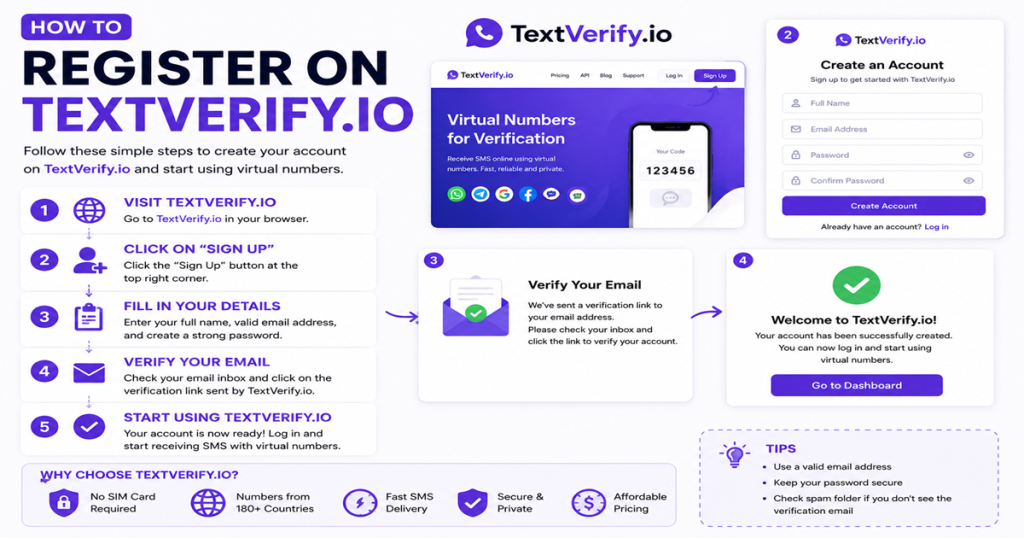
How to Create Your TextVerify.io Account
Before you can get a number, you need an account. Setting one up is quick and costs nothing.
| 🌐 |
Go to TextVerify.io
Open textverify.io in your browser. Look for the account creation option at the top of the page. No personal details are needed — just your email.
|
| 💌 |
Set Up Your Email and Password
Type in your email and create a password you will remember. That is all that is required. No phone number needed to create an account.
|
| 💻 |
Open Your Dashboard
Once registered, you land straight on your TextVerify dashboard. This is where you pick numbers, track active ones, and see incoming SMS codes as they arrive.
|
| 💰 |
Add Credits to Your Balance
Top up your account balance through the dashboard. Once credits are available, you can get a number in one click and start verifying right away.
|
5
Step-by-Step: How to Verify Any Account
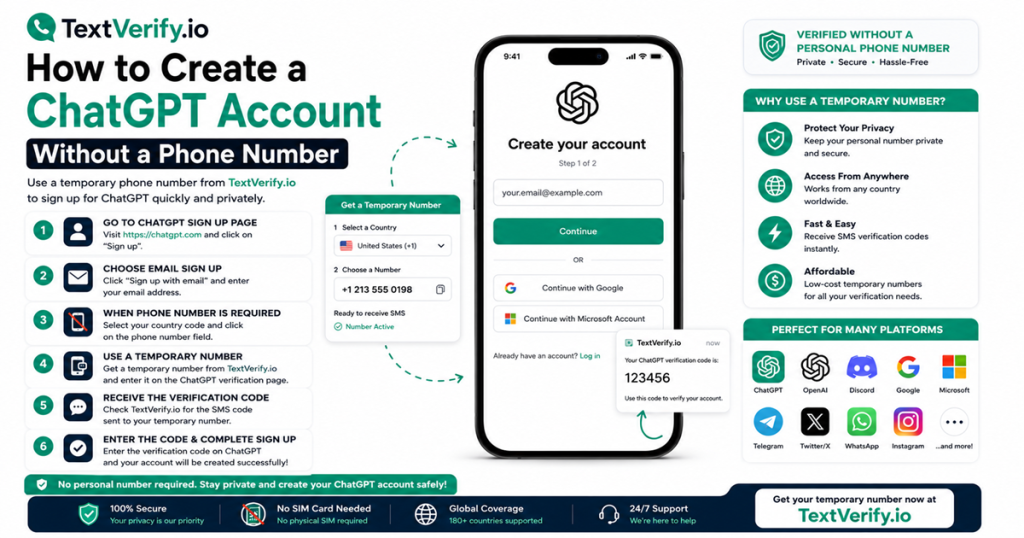
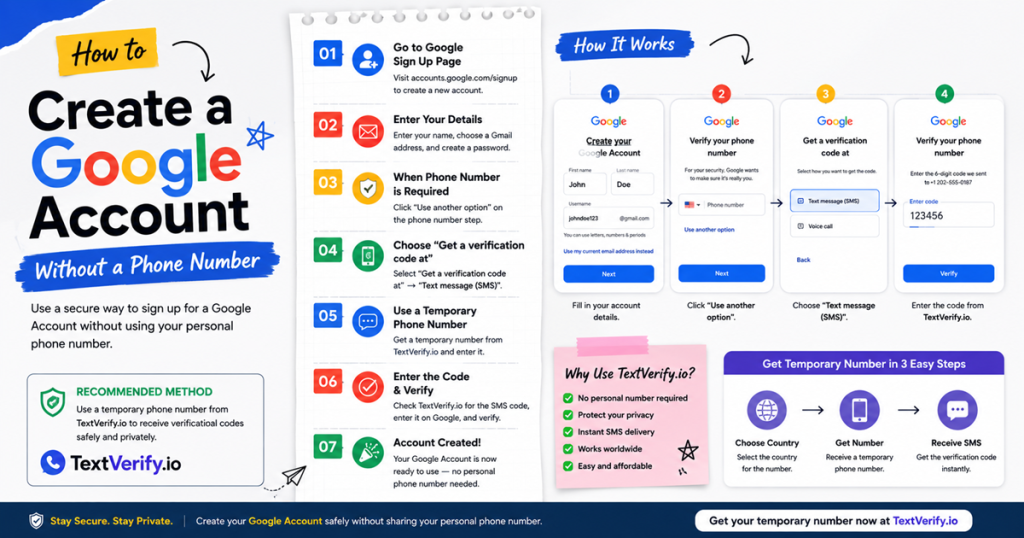
Here is the exact process for using a temporary phone number for verification — whether you are signing up for Google, WhatsApp, Discord, or any other service:
| 📱 |
Pick a Number Type
Choose a Temporary Number for a single one-time verification — short window, US state of your choice. If you need the same number for several days with no SMS limits, go with a Rental Number instead.
|
| 📌 |
Choose a US State if Needed
Select a state that matches where your account is based. For most platforms this does not matter, but it is worth doing for services that are strict about location matching.
|
| 📋 |
Copy the Number and Paste It In
Copy your TextVerify number and paste it into the phone number field on the platform you are signing up for. Make sure the country is set to United States (+1) before you request the code.
|
| ⚡ |
Check Your Dashboard for the Code
Switch back to TextVerify. Your SMS code should already be there — it usually appears within a few seconds. Copy it straight away before the window expires.
|
| ✅ |
Enter the Code and You Are Done
Paste the code into the platform and confirm. Your account is verified and ready to use. The whole thing is over in minutes, and your personal number was never part of it.
|
⚠️ One tip: Have TextVerify open in one tab and the platform in another. SMS codes on most sites expire within a few minutes, so the faster you switch over and paste it in, the better.
| ❌ |
Trying a free VoIP number first. If Google Voice or TextNow fails, you may trigger the platform’s rate limit on code requests — locking you out before you switch to a carrier number. Go straight to a working solution. |
| ⏰ |
Waiting too long before requesting the code. Get your TextVerify number, immediately open the target platform, and request the code right away. The number’s active window is short — every minute you wait before triggering the SMS shortens the time you have left. |
| 🌍 |
Not matching the area code to your account location. Strict platforms like financial apps and Google check whether the number’s area code is consistent with the account’s region. Pick a US state that matches your billing address or account setup location. |
| 📌 |
Using a temporary number for an account that will need ongoing SMS codes. A one-time temporary number expires quickly. If the platform will send you security codes regularly (e.g., two-factor authentication on a payment account), use a rental number instead so the same number stays active. |
| 🔄 |
Not trying a different number if the first one does not deliver. If 30 seconds pass with no code, tap Resend on the platform and check your TextVerify inbox. If it still does not arrive, get a fresh number. You only pay when a message actually lands — switching is free if the first number failed. |
7
Frequently Asked Questions
| Q |
How do you use a temporary phone number for verification?
Create a free account on TextVerify.io, add credits, select a temporary number, copy the US number, enter it on the platform you want to verify, and grab the SMS code from your TextVerify dashboard. Start to finish, it takes under five minutes.
|
| Q |
Why do free number sites get rejected by platforms like Google?
Most free services use VoIP numbers — numbers that are created digitally rather than issued by a real mobile carrier. Major platforms have systems in place to spot these and block them. TextVerify uses numbers from actual US mobile networks, which is why they go through without any issues.
|
| Q |
What is the difference between a temporary and a rental number?
A temporary number is built for quick, one-time use — enough for a single signup. A rental number stays active for days and has no SMS limit, so it is a better fit for accounts that regularly send security codes or if you need to verify the same number more than once.
|
| Q |
What if the code does not show up on my dashboard?
First, hit Resend on the platform and give it about 30 seconds. If nothing comes through after that, request a fresh number and try again. You are not charged for any number that did not receive a message.
|
| Q |
Is it safe to use a temporary number for verification?
Completely. In fact, using a temporary number keeps you safer than handing over your real one. Your personal number does not go anywhere near the platform you are signing up for, which means no spam calls, no marketing texts, and no exposure if that platform ever has a data issue.
|
✅
Bottom line
Knowing how to use a temporary phone number for verification is one of the simplest ways to protect your privacy whenever you sign up for something new online. With TextVerify.io, the whole process is fast, works on more than 100 platforms, and keeps your personal number completely out of the picture the entire time.
Temporary Phone Number Verification
How To Use Temporary Number
SMS Verification
Non VoIP Number
Real US Phone Number
TextVerify
OTP Verification
Privacy
Disclaimer: TextVerify is an independent third-party service and is not affiliated with, endorsed by, or connected to any of the platforms mentioned in this article. All trademarks belong to their respective owners.